AWS Cloud Security Engineering Project

Stopping Attacks and Reducing
Cloud Misconfiguration

Built by Ebenezer Takpor at Phylax Cyber

How I built an AWS environment that blocks malicious traffic, detects risky configuration changes, remediates them automatically, and verifies compliance afterward.

What happens after deployment, when traffic turns hostile or someone makes a dangerous configuration mistake?

This project explores both sides of cloud security: stopping bad traffic before it reaches the application and reducing configuration drift inside the environment.

● LIVE AWS PROJECT
The Setup

Before protecting the server, I made it harder to reach.

When you visit this website, your browser does not connect directly to the computer hosting it.

The Nginx web server runs on an Amazon EC2 instance inside a private subnet. It has no public IPv4 address.

All public traffic has to enter through an Application Load Balancer first.

Internet Visitor Application Load Balancer AWS WAF Private EC2 / Nginx
Think of it like an office building. Visitors can enter through the front lobby, but they cannot walk directly into the server room.
Attack Prevention

First, I attacked my own website.

Turning on a security product is easy. Proving that it actually works is more interesting.

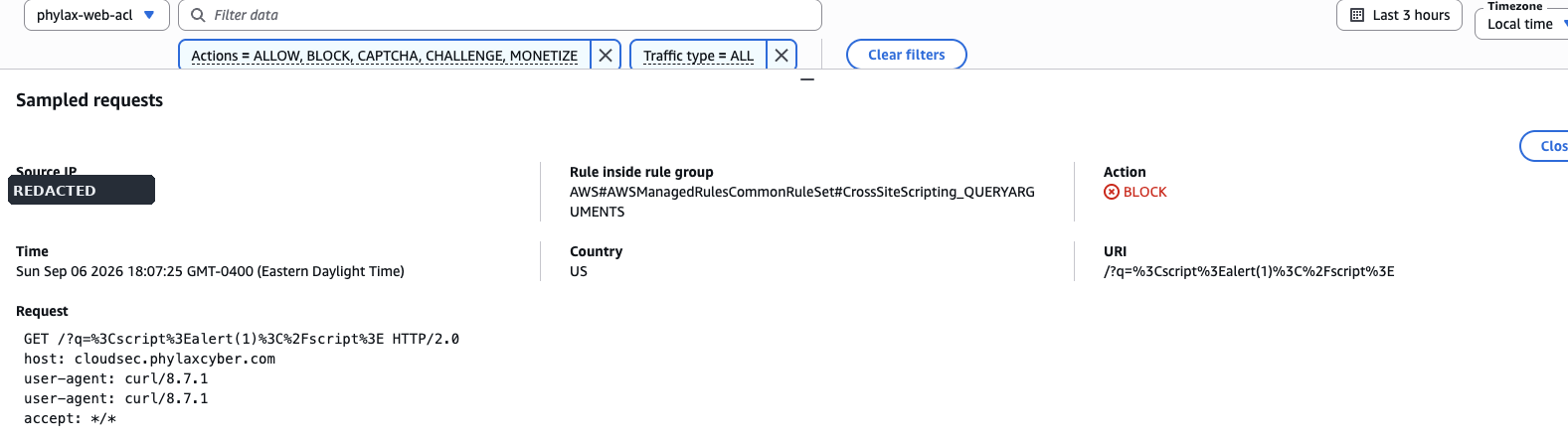
I sent the live application a request designed to resemble a cross-site scripting attack, commonly known as XSS.

Instead of reaching Nginx, the request was stopped by AWS WAF.

Test Result
HTTP/2 403 Forbidden
Rule: CrossSiteScripting_QUERYARGUMENTS
Evidence #1 BLOCKED
AWS WAF XSS screenshot will appear here
AWS WAF stopped the malicious-looking request before it reached the private application server.
In plain English The security guard at the front entrance rejected the visitor before the visitor reached the application.
Configuration Drift

But attackers are not the only source of risk.

Sometimes the problem is a human mistake.

Cloud environments change constantly.

Administrators create servers, change network rules, update permissions, and modify security groups.

One small configuration change can accidentally expose a resource.

So I deliberately created one of the classic dangerous cloud configurations.

Misconfiguration Introduced
SSH
TCP Port 22
Source: 0.0.0.0/0
What does 0.0.0.0/0 mean? For someone learning cloud security, think of it as:

"Allow any computer on the internet."

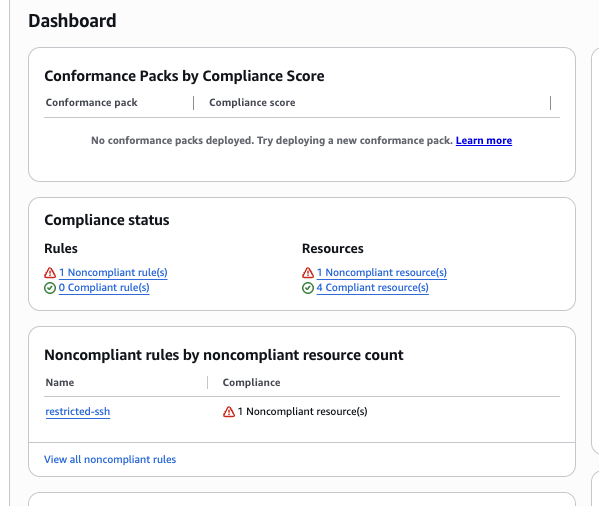
AWS Config was continuously evaluating the environment.

It detected the exposed SSH rule and marked the resource:

Compliance Status
NON_COMPLIANT
Evidence #2 NON-COMPLIANT
AWS Config NON_COMPLIANT screenshot
AWS Config independently detected the dangerous SSH configuration.
Automated Remediation

Detection was only half the problem.

At this point, AWS knew something was wrong.

But the dangerous rule was still there.

So I built an event-driven response.

Step 1

Security group changed

Public SSH access was added.

Step 2

CloudTrail recorded the API call

AWS captured who made the change, where it came from, and what resource was modified.

Step 3

EventBridge detected the event

The AuthorizeSecurityGroupIngress API event matched the EventBridge rule.

Step 4

Lambda investigated

The function checked whether the resource was approved for remediation, whether TCP/22 was exposed, and whether the source was 0.0.0.0/0.

Step 5

The unsafe rule was removed

Lambda revoked the public SSH ingress rule.

Step 6

The operator was notified

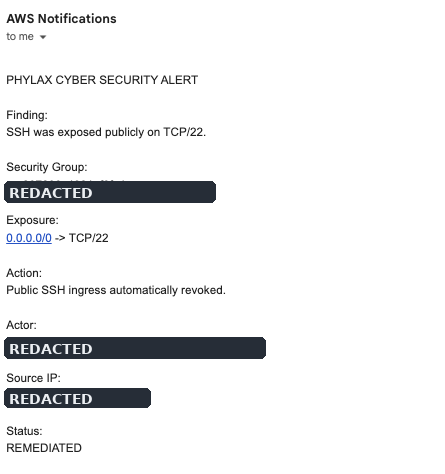
SNS emailed the incident details and confirmed the status as REMEDIATED.

I refreshed the security group. The SSH rule was gone.

I did not manually delete it.
Evidence #3 REMEDIATED
SNS remediation email screenshot
The notification records the affected resource, actor, source IP, exposure, action taken, and remediation status.
Guardrails

I didn't let Lambda touch everything.

Automatic remediation is powerful.

That also makes it dangerous if the automation contains bad logic.

A resource must explicitly opt into remediation using this tag:

AutoRemediatePublicSSH = true
Automation needs boundaries. Think of the tag as an approved list saying:

"You are allowed to automatically protect this resource."
Verification

Fixing the problem wasn't enough. I wanted proof.

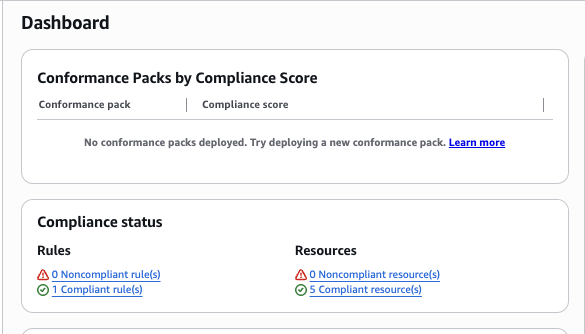
After Lambda removed the public SSH rule, AWS Config evaluated the environment again.

Before Remediation

1 NON_COMPLIANT resource

After Remediation

0 NON_COMPLIANT resources

Misconfiguration Detection Decision Automatic Remediation Alert Compliance Restored
Evidence #4 COMPLIANT
AWS Config COMPLIANT screenshot
AWS Config independently confirmed that the dangerous configuration no longer existed.
Another Lesson

Then I removed a NAT Gateway and accidentally broke administration.

During the build, the private EC2 instance used a NAT Gateway for outbound access.

Once the application was configured, keeping the NAT Gateway running for a small portfolio project no longer made sense.

So I removed it.

The website stayed online.

AWS Systems Manager did not.

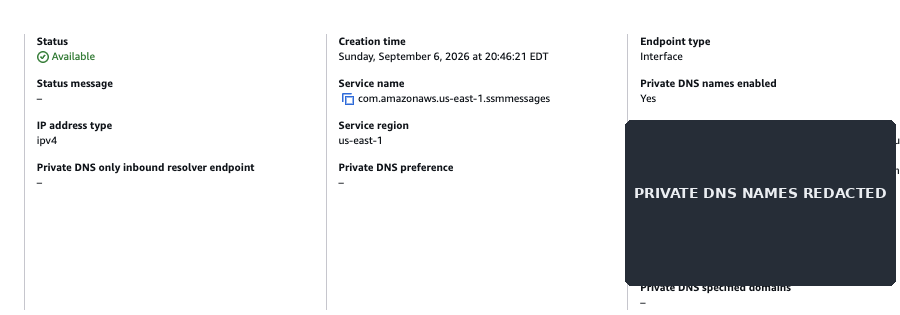
Instead of restoring broad internet access, I created private VPC interface endpoints specifically for Systems Manager.

Private EC2 HTTPS 443 Private SSM Endpoint AWS Systems Manager
The better fix wasn't putting NAT back. It was understanding the hidden dependency and replacing it with a narrower, private connection.
Cloud Security in Plain English

What do all these AWS services actually do?

AWS Service Think of it as...
Application Load Balancer The front entrance to the application
AWS WAF A security guard checking visitors
Private EC2 The protected server room
CloudTrail A security camera recording AWS actions
AWS Config An auditor checking whether resources follow the rules
EventBridge An alarm system reacting to important events
Lambda An automated security responder
SNS The notification system
GuardDuty A cloud threat-detection service
Security Hub A central security dashboard
Systems Manager A secure administration channel
What I Learned

Cloud security isn't about turning on as many security services as possible.

The interesting part is making them work together.

A change becomes a signal The signal becomes a decision The decision becomes an action The action becomes an alert Another control verifies the environment is secure again

That is what I wanted Phylax Cyber to demonstrate.